When you return from an awesome trip, friends, family and co-workers often want to hear all about it. Where did you stay? What did you do? Many times, they are thinking about planning their own trip to the same place and would love to know what you'd recommend.
Mentioning a few highlights in conversation leaves out a lot of details, and writing an email can be a pain. But if you're using Planapple, sharing your favorites from a recent trip just got a whole lot easier with our new Public Favorites feature.

A simple tool for making travel planning easier.
Showing posts with label New Features. Show all posts
Showing posts with label New Features. Show all posts
Thursday, October 27, 2011
Sunday, October 16, 2011
Easier, cleaner entry details
We've noticed (OK, several of you have pointed out) that our "entry details page" could be somewhat annoying. Sure, there were places to enter just about anything you wanted to keep track of for an entry: its address, phone number, contact email, cost, etc. But a lot of the time all that detail just doesn't matter. And worse, showing all those (often unused) pieces of info meant you constantly had to scroll down to get to the good stuff -- the link to the entry's web site, comments from your tripmates, etc.
We recently rolled out a new design for the entry details page that we hope makes this much easier. Now all those details are kept in a details pod at the top right, and we hide the ones you aren't using. Just expand the details pod ("Edit Details") to see and edit everything.
We've also moved the link to the entry's web site up to the top, just under the title, where many of you told us you were expecting to find it. And we've added an overview of votes and comments up near the title, too.

We recently rolled out a new design for the entry details page that we hope makes this much easier. Now all those details are kept in a details pod at the top right, and we hide the ones you aren't using. Just expand the details pod ("Edit Details") to see and edit everything.
We've also moved the link to the entry's web site up to the top, just under the title, where many of you told us you were expecting to find it. And we've added an overview of votes and comments up near the title, too.
The new entry details page and the expanded details pod


Thursday, October 13, 2011
Add notes and paste web stuff into your trip
When first getting started on Planapple, we mainly used it to keep track of our travel related bookmarks from the web. With the Planapple bookmarking tool, we saved B&B web sites, reviews from Trip Advisor or Yelp, NY Times articles, or even flight searches and online itineraries.
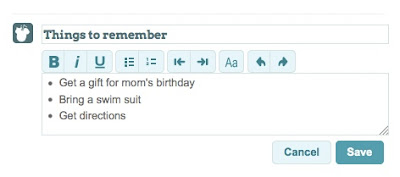
As time went on we realized that we also needed to add simple notes or lists of things to remember ("don't forget to buy a gift for Mom's birthday"). Other times we wanted to copy and paste just a snippet of text from a web page or an email (often directions or check-in information).
Today, we've added a new feature to Planapple that lets you add free-form notes to your trip. They show up just like entries you added by bookmarking or emailing save@planapple.com, and you can stick these notes in categories, add comments to discuss with other travelers, even drop them in your itinerary. You can also use simple text formatting like bullet points, numbered lists, or bold and italic for emphasis. And if you copy and paste something from a web page (such as a table of flight information), much of the formatting should be preserved.
At the bottom of any list of entries, click "Add Entry" to try it out and let us know what you think!
As time went on we realized that we also needed to add simple notes or lists of things to remember ("don't forget to buy a gift for Mom's birthday"). Other times we wanted to copy and paste just a snippet of text from a web page or an email (often directions or check-in information).
Today, we've added a new feature to Planapple that lets you add free-form notes to your trip. They show up just like entries you added by bookmarking or emailing save@planapple.com, and you can stick these notes in categories, add comments to discuss with other travelers, even drop them in your itinerary. You can also use simple text formatting like bullet points, numbered lists, or bold and italic for emphasis. And if you copy and paste something from a web page (such as a table of flight information), much of the formatting should be preserved.
At the bottom of any list of entries, click "Add Entry" to try it out and let us know what you think!
Subscribe to:
Posts (Atom)