Friday, November 21, 2014

Dropping support for older browsers

On January 1, 2015, Planapple will discontinue support for Internet Explorer 8 and 9. If you're using one of these browsers with Planapple, you'll need to upgrade to a newer version of Internet Explorer—or switch to Firefox or Chrome.

You can find out what browser you're using, and get more info about upgrading or changing web browsers at whatbrowser.org.

We're working on some big improvements to Planapple, to make it faster, better, and easier than ever. And those changes just won't be possible on the older versions of IE. So it's time we have to say goodbye to IE8 and IE9.

Are you running Windows XP?

If you're still using Windows XP, you probably know that Microsoft discontinued support for it earlier this year, and it's not possible for you to get IE10 or IE11. But don't worry: both Firefox and Chrome run on XP, and they work great with Planapple. Visit whatbrowser.org for links to install them.

You'll definitely need to have all of the Microsoft XP updates installed—including Windows XP Service Pack 3.

Change can be good

We know not everyone likes change. And if you're affected by this, we apologize for the inconvenience. Planapple has actually held out longer than most: Google Apps dropped support for IE8 two years ago and IE9 last year. And even Microsoft doesn't support IE8 with the latest versions of Office.

Here's the silver lining: if you're still running IE8 or IE9, you'll find that a lot of web sites (including Planapple) run much faster after you switch to a newer web browser.

Sunday, October 14, 2012

Planning Trips with Planapple and TripIt

There are a lot of great travel sites on the web that genuinely make travel easier. One of the best, is the itinerary organizing tool TripIt. TripIt makes keeping track of flight and hotel schedules a cinch by automatically reading your confirmation emails, pulling out the relavant dates and times, and combining them into single itinerary, accessible via the web and a mobile app. Using TripIt can make planning trips with Planapple even easier.

Create Your Master Plan in Planapple, Pull in Flight Info From TripIt

We use Planapple during the planning stage of our trips to collect all of our ideas into one place. Stuff we want to discuss (places to stay, things to do), organize, see on a map, and mark as 'must see' or 'maybe' etc... Once we've got flights booked however, sometimes we forward those confirmation emails to TripIt to see them as a single itinerary.

Wouldn't it be nice to be able to import all of that itinerary info from TripIt into your "master" trip plan on Planapple? Well now you can.

Import Itinerary and Flight Info from TripIt

If you're a TripIt user, Planapple's new "Import from TripIt" feature makes getting your flight details into your Planapple trip plan easier than ever.

The first thing you need to do is to make sure your trip has its start and end dates set. This how Planapple knows what items from TripIt it should import. (You can set your trip dates by clicking "Edit Trip" under your trip's name on the top right of the Planapple trip page.)

Then just click the "Import itinerary from TripIt" link under the calendar widget on the right side of your trip page. This will bring up the "Import from TripIt" dialog with an input field for your TripIt "calendar feed url."

Next you will go to TripIt in another browser window, find and copy your "calendar feed url" on TripIt, and paste it into the input field in this dialog.


Thursday, July 12, 2012

Sync your Planapple trips with Google Calendar and iCal

While it would be nice to do nothing but travel and plan trips with Planapple full time, most of us have busy lives filled with work, family, and social appointments. There are lots of great, free, calendar programs out there to help us keep track of these crazy schedules such as Google Calendar and Apple iCal. Wouldn't it be great if all of your Planapple trip plans automatically appeared in your main calendar program so you could keep track of them there along with everything else?

Sync Itinerary With Calendar

As of today, Planapple's new "Sync Itinerary" feature makes this easy. Once you've added start and end dates to your trip, click on the "Sync itinerary with Google Calendar or iCal" link under the calendar widget on the right side of the main trip page.

This will bring up a dialog with a special link that you can copy and paste into most calendar programs. This will let them import all of your scheduled Planapple trips and itineraries as a shared calendar. (For those who are curious, the link is called an iCal Feed which is like an RSS or news feed for your calendar).

Tuesday, April 24, 2012

Planning a Trip with Pinterest and Planapple

My wife and I enjoy using Planapple to plan trips, and have been using it for a couple of years to plan everything from weekend 'get-aways' to multi-stop adventures. It's a simple tool that lets us collect cool ideas from around the web, talk about them, make plans, and take them with us on the road.

Pinterest + Planapple = Pretty Fun

Recently we discovered Pinterest and were struck not only by the breadth of beautiful imagery shared there, but also the variety of cool 'bucket lists' users were creating to catalog the interesting places they want to visit. Browsing through these boards, we thought Pinterest + Planapple would be a great combo to get ideas and inspiration for our next adventure.

Country road in Sonoma County
With the newest addition to our family having recently arrived, we decided to take baby steps for our next trip and visit the relatively close & familiar destination of Sonoma Wine Country in a few months time.

We've been to Sonoma many times before and love it, but are looking forward to getting a different perspective using Pinterest as a starting point for ideas.

This article will walk you though how we planned our trip using Pinterest and Planapple. Turns out, it actually worked pretty well. Find out more after the jump.

Friday, January 27, 2012

How to Plan a Trip With Planapple

A lot of new people have been visiting Planapple recently, and some have asked what the best way is to get started. Here's a simple guide to get you going and show you how Planapple makes planning a trip easier.

What is Planapple?

At its heart, Planapple is a research and planning tool for the web. It gives you a single place to save your research, talk about it with tripmates, and take it with you on your smart phone.

Planning a trip on Planapple often looks like this:

You:

  • Surf the web to find interesting ideas on sites you like.
  • Save those pages to your trip on Planapple with the bookmarking tool.
  • Talk about stuff with tripmates back on Planapple via comments in the discussion section (ie "What do you think of these 3 hotels?").
  • Organize things into lists, make decisions, and perhaps build an itinerary.
  • Go on your trip and access the stuff you saved on Planapple from the mobile app.

Let's get started.

Tuesday, January 3, 2012

Yeah, but what does everyone else have to say?

So you're planning a last-minute weekend getaway, and you've both decided Saturday night should be a splurgy, super-special, won't-soon-be-forgotten kind of dinner. You've got it narrowed down to three possible restaurants you found on Yelp, and bookmarked all of them into your Planapple trip.

So how to decide? Wouldn't it be nice if you could check the reviews on other sites like TripAdvisor and Yahoo Local, look at a copy of each restaurant's menu, or check on OpenTable to see if there are even reservations still available? "Easy enough," you say, "I know how to use the web."

And you could do that. But at Planapple we hate having to repeatedly retype things like the name of each restaurant. And we hate getting to a site and finding out it doesn't actually have any information on the restaurant. So instead, we're going to make Planapple do the work for you.

We've added magic links on each item's details page. In the bookmarks section, we'll show you all the links we could find for that place at other web sites, automatically...


... some you know, and some you may not have heard of before. But all there, ready for the clicking, without any extra effort on your part. Ta-da!

Find more travel ideas, more easily

If you're using our bookmarking tool, you know how Planapple makes it easy to keep track of all the travel ideas you find around the web. But did you know Planapple can help you explore the web for new ideas, too?

At the top of every category page (like Lodging or Dining), you'll find suggested searches:
Many of these are sites our users have found helpful for planning their own trips. You can either type in your own search term in the box (e.g., "beachfront condo") or just click one of the links below it.

And Planapple doesn't just link to these sites, it actually fills in their search forms for you with your destination and travel dates whenever possible. So if you're looking for (say) hotels or airline tickets, you don't have to keep re-typing your trip details at all those other sites.

Monday, December 5, 2011

Planapple goes mobile for iPhone, Android and BB6

That's right, we're thrilled to finally take the cover off of our new Planapple mobile app, which will let you take all of your plans and research with you on the road. The app runs in a standard web-browser (using HTML5 - if you're into that sort of thing) but lets access all of your information offline or in 'airplane-mode' if you don't want incur any roaming charges when traveling overseas. No app-store download, installation or purchase is required.

Get your trip on your phone

Here's how it works:
  1. On your phone, go to www.planapple.com/m/ (notice the extra "/m/" on the end). 
  2. After Planapple finishes loading, tap "Sign In" and then log into Planapple as usual.
  3. In a moment, your current trip information will appear. (Tap "My Trips" at the bottom to choose from your other trips.)
Currently the app will run well on iPhones (use Safari to be able to create a homescreen shortcut), Android phones and V6 BlackBerries.

Friday, November 18, 2011

Use Planapple with Facebook, Twitter, and Google

This week we turned on integration with Facebook, Twitter, and Google. There are two immediate benefits:

1. If you're using our new "public favorites" feature that Pete wrote about recently, you'll find Facebook Like and Send buttons on your public favorites pages. You can use the Send button to easily send your favorite travel ideas to your friends on Facebook, and of course they can Like what they see. Plus, we've hooked up Facebook comments for discussing your favorite places with your friends.


2. When you invite family and friends to help you plan a trip, they can use their existing Facebook, Twitter, or Google accounts (Gmail or Google Apps) to start using Planapple instantly -- without having to register for a new Planapple account or verify their email addresses.


We added these same three buttons to our sign-in page, too. If you'd like to convert your Planapple account so that you can sign into it using Facebook, Twitter, and/or Google, just go to the Planapple Linked Accounts settings and follow the instructions there.

We'll be adding additional Twitter, Google, and Facebook features in the future. Let us know how you'd like to connect Planapple with other services you use -- just click the Feedback link on the right.

Thursday, October 27, 2011

Share tips with friends using Public Favorites

When you return from an awesome trip, friends, family and co-workers often want to hear all about it. Where did you stay? What did you do? Many times, they are thinking about planning their own trip to the same place and would love to know what you'd recommend.

Mentioning a few highlights in conversation leaves out a lot of details, and writing an email can be a pain. But if you're using Planapple, sharing your favorites from a recent trip just got a whole lot easier with our new Public Favorites feature.

Sunday, October 16, 2011

Easier, cleaner entry details

We've noticed (OK, several of you have pointed out) that our "entry details page" could be somewhat annoying. Sure, there were places to enter just about anything you wanted to keep track of for an entry: its address, phone number, contact email, cost, etc. But a lot of the time all that detail just doesn't matter. And worse, showing all those (often unused) pieces of info meant you constantly had to scroll down to get to the good stuff -- the link to the entry's web site, comments from your tripmates, etc.

We recently rolled out a new design for the entry details page that we hope makes this much easier. Now all those details are kept in a details pod at the top right, and we hide the ones you aren't using. Just expand the details pod ("Edit Details") to see and edit everything.

We've also moved the link to the entry's web site up to the top, just under the title, where many of you told us you were expecting to find it. And we've added an overview of votes and comments up near the title, too.

The new entry details page and the expanded details pod


Thursday, October 13, 2011

Add notes and paste web stuff into your trip

When first getting started on Planapple, we mainly used it to keep track of our travel related bookmarks from the web. With the Planapple bookmarking tool, we saved B&B web sites, reviews from Trip Advisor or Yelp, NY Times articles, or even flight searches and online itineraries.

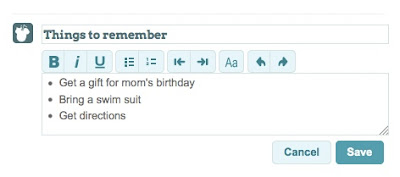
As time went on we realized that we also needed to add simple notes or lists of things to remember ("don't forget to buy a gift for Mom's birthday"). Other times we wanted to copy and paste just a snippet of text from a web page or an email (often directions or check-in information).

Today, we've added a new feature to Planapple that lets you add free-form notes to your trip. They show up just like entries you added by bookmarking or emailing save@planapple.com, and you can stick these notes in categories, add comments to discuss with other travelers, even drop them in your itinerary. You can also use simple text formatting like bullet points, numbered lists, or bold and italic for emphasis. And if you copy and paste something from a web page (such as a table of flight information), much of the formatting should be preserved.

At the bottom of any list of entries, click "Add Entry" to try it out and let us know what you think!


Tuesday, October 11, 2011

Hello World!

Hey there and welcome to the inaugural entry of the Planapple company blog! Over the last several months we've been hard at work designing and building a better tool to help ourselves (and people like us) organize travel plans. After a few round-trips to the drawing board, we think we've got something that's actually pretty handy, and are excited to start sharing it with other folks on the web.

Planapple: What is it?

Planapple helps you organize all your travel stuff in one place, talk about it with family and friends, and take it with you on the road.

If you're like us, planning for a trip often involves a bit of web research, a lot of emails, a few dates on the calendar, and a lot of ideas that might be interesting to check out once you're there. Keeping track of all of this stuff can be a pain. In the past everything was spread across email threads, browser bookmarks, calendars, notebooks and even voice mail. For larger trips we might actually print everything out on paper and assemble it into a 'travel binder' that we could take with us on the road.

Planapple provides a single place on the web to store all of this stuff, organize it (as much as you want), and discuss it with other travelers on your trip. Think of it like a virtual bulletin board/notebook for your trip. You can forward in emails to it, save bookmarks to it, and copy and paste text and notes from any web page, all while posting updates, questions and comments to everyone you're traveling with.

Stay Tuned, There's More To Come!

While we think the version of Planapple available now is pretty useful, we're just getting started. We've got a slew of ideas and features in the hopper that we're excited to roll out over the course of the year. Stayed tuned and check back to this blog often to see what's new, as well as to find tips and tricks for using the product.

And, most importantly, we'd love to hear your feedback and ideas about how make Planapple a better helper for simplifying your travel planning process. As two guys with a couple of computers, we're only half the team required to build a great product that solves a real problem. The other half is you the customer - so let us know what you need! Please feel free to click on the "Feedback" tab on the right to share your thoughts with us or get help with any questions or concerns.

Thanks!

Thanks again for trying Planapple, and we wish you many happy trips in the future!

The Planapple Team (Pete & Mike)